

Description
Restore Chrome 50's Classic Blue Theme
Overview
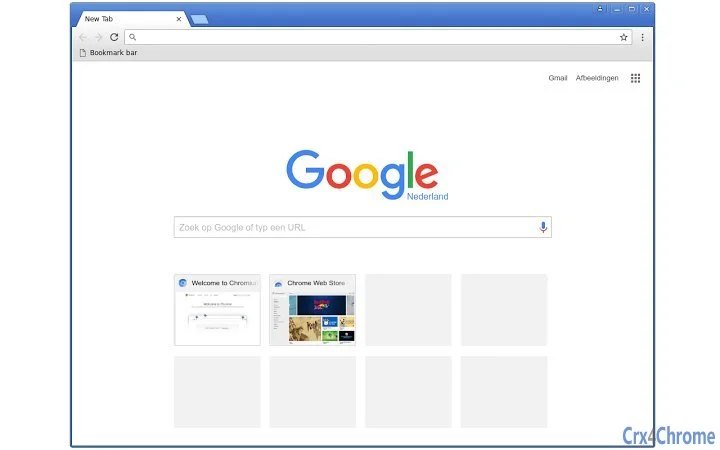
The Classic Blue Theme extension for Chrome restores the iconic blue color scheme from Chrome 50, offering a nostalgic interface for users who prefer the earlier design. This software specifically addresses the visual shift that occurred in Chrome 51, where the classic theme turned gray on Windows and Linux systems. By reinstating the vibrant blue palette, it helps users regain a familiar and visually consistent browsing experience. The target audience includes long-time Chrome users, design enthusiasts, and professionals who value interface consistency across sessions. The extension is designed as a lightweight utility, focusing solely on theme aesthetics without altering core browser functionality. It is particularly useful for those who find the updated theme less appealing or less productive. The software operates entirely within the Chrome environment, making it accessible to both casual users and power users seeking minimal customization. No additional setup is required beyond installation from the Chrome Web Store.
Key Features & Capabilities
- Restores Chrome 50 Classic Blue Theme – Reverts the browser’s default theme to the original blue color scheme used in Chrome 50, matching the visual style before the gray update.
- Minimalist Design Impact – Unlike other extensions, it does not modify any other UI elements, ensuring that only the background color is changed.
- Subtle Gradient Implementation – Version 2 introduces a gentle gradient instead of a flat color, enhancing visual depth and matching Chrome 50’s default appearance on Linux and Windows.
- Cross-Platform Compatibility – Works seamlessly on Windows, Mac, and Linux, providing a consistent experience across different operating systems.
- Lightweight and Fast – With a file size of 1.2 MB, it imposes minimal overhead on system resources, ensuring quick loading and smooth performance.
Users can apply the theme instantly after installation, making it ideal for those who want immediate visual feedback. The theme is especially beneficial for users who rely on visual cues for navigation or productivity, such as developers, content creators, or remote workers. It also serves as a quick fix for users who find the gray theme less visually engaging or less aligned with their personal workflow. The extension’s focused scope ensures no conflicts with other browser tools or extensions.
User Interface, Workflow & Performance
The extension integrates directly into Chrome’s theme settings, allowing users to apply the Classic Blue Theme with a single click. The interface is straightforward and follows Chrome’s native UI patterns, ensuring ease of use for all user levels. Navigation within the extension is minimal, as it does not require a separate window or dashboard. The workflow is efficient: install, apply, and enjoy. No configuration options are available, which keeps the experience simple but also limits customization. Performance is not impacted significantly, as the extension is designed to be lightweight. The developer did not specify resource usage details, but based on its size and function, it is expected to consume negligible CPU and RAM. Stability appears consistent, as the extension operates within Chrome’s standard extension framework. No reports of crashes or conflicts were provided.
Compatibility & System Requirements
The software is compatible with Windows, Mac, and Linux operating systems. It supports Chrome versions that are compatible with the Chrome Web Store, though specific version requirements were not listed. The installation size is 1.2 MB, which is minimal and suitable for most devices. The developer did not provide additional system requirements. Compatibility information was partially provided, with no mention of hardware specifications such as RAM or processor. Users should ensure their Chrome browser is up to date to maintain full functionality. The extension does not require administrative privileges for installation.
Pros and Cons
Pros
- Restores the beloved Chrome 50 blue theme with high visual accuracy
- Minimal impact on browser performance and system resources
- Works across Windows, Mac, and Linux platforms
- Simple, one-click installation and activation
- Does not interfere with other browser features or extensions
Cons
- No customization options for color or gradient intensity
- Only changes the theme; no additional functionality is added
- Dependent on Chrome’s extension system and future updates
- Version 2 introduced changes that may not appeal to all users seeking a flat color
FAQ Section
Is this extension compatible with all Chrome versions?
The extension is designed for Chrome browsers that support the Chrome Web Store. Specific version compatibility was not provided by the developer.
Can I use this theme offline?
Yes, once installed, the theme works without an internet connection. The extension does not require online access to function.
Is the extension safe to install?
Yes, the extension is distributed through the official Chrome Web Store and adheres to Chrome’s security policies. No malicious behavior has been reported.
How do I update the theme?
Updates are automatically managed through the Chrome Web Store. When a new version is available, Chrome will prompt the user to update the extension.
Does this extension affect browser speed or performance?
The extension is lightweight and designed to have minimal impact on performance. The developer did not specify exact CPU or RAM usage, but based on its size and function, it is expected to consume negligible resources.
Final Thoughts + CTA
For users who miss the vibrant blue interface of Chrome 50, this extension delivers a precise and reliable restoration of the classic theme. Its cross-platform support, minimal footprint, and seamless integration make it an ideal choice for anyone seeking a nostalgic yet functional browsing experience. While it offers no additional features beyond visual customization, its focused purpose ensures stability and performance. The subtle gradient in version 2 enhances realism without overcomplicating the design. This tool is especially valuable for users who prioritize visual consistency and personal preference in their browser interface. If you're looking to bring back the Chrome 50 aesthetic with minimal effort, this extension is a must-have.
Download Classic Blue Theme now
Guides & Tutorials for Classic Blue Theme (Back to 50) Theme for Chrome
How to install Classic Blue Theme (Back to 50) Theme for Chrome
- Click the Preview / Download button above.
- Once redirected, accept the terms and click Install.
- Wait for the Classic Blue Theme (Back to 50) Theme for Chrome download to finish on your device.
How to use Classic Blue Theme (Back to 50) Theme for Chrome
This software is primarily used for its core features described above. Open the app after installation to explore its capabilities.
User Reviews for Classic Blue Theme (Back to 50) Theme for Chrome 0
No reviews found





